
For example, a church/organization may create a group called "Men's Morning Prayer Group". The members of that prayer group would then be able to create a confidential shared list where they can all share and see one another's prayer requests.
Available Groups can be found on the left. Clicking on a group allows you to see the details of the Group.
A PrayMore Group will have Lists and Members. See an example of the "Everyone" Group below.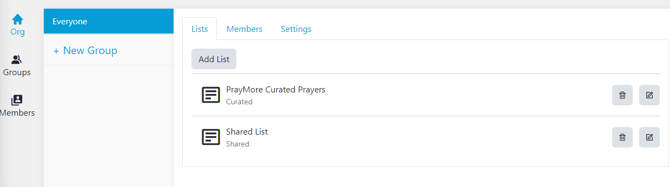
Lists Tab
The Lists Tab shows all of the configured lists that the group can collectively see. In the case above, we have created two lists that the members can use, the Curated list and the Shared list. Both of these lists can contain prayers and announcements that all members can see. The general rule of thumb is not to make someone a member of your group if you don't want them to be able to see everything in it. See more about the Lists Tab
Members Tab
The Members tab shows a list of all of the group members. Here, you can manually add or remove a user from the group as well as control which users are Approvers or Admins of the group.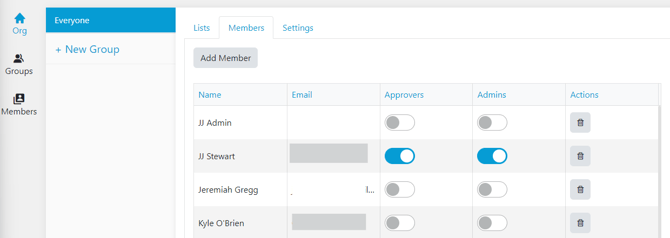
Approvers are users that you select that can approve the content of a request when our AI has flagged it as being possibly problematic. When a request is submitted that could be a problem, the Approver will be sent a notification with the text of the request. They can then choose to approve or deny the request. If approved, the request will be shared to the list. If denied, it will be deleted. More information on approvals
Admins have permission to manage the group members from PrayMore on their phones as well as share the QR codes that are used to add members to the group. Most of the time, the group Admins will be the same people as the Approvers.
Settings Tab
The settings tab allows you to upload a logo and a header image.
The Logo must be of type PNG and be 500 x 500 pixels. It should be a group logo, not a photograph. This image is displayed in PrayMore as the "user" image for a Curated List as well as when selecting lists on the Lists page.
The Header Image can be a photograph or other art to be used as a background to the list headers. It must be of type JPG file and be 1920 x 1080 pixels.
For more information on the relationship between Groups and Lists, see this article