
To access the Preferences screen, tap Profile>Settings>Edit Preferences. The Preferences screen allows you to set your Profile photo, Display Name, and other settings that affect how other users see your profile in PrayMore.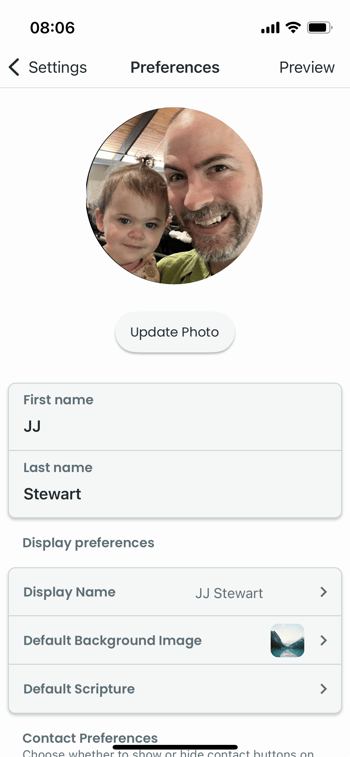
Update Photo
Allows you to select a profile photo from your photo library on your phone. We recommend setting a Photo because it makes PrayMore more personal and is very helpful to the person that is praying for you. Once you select a photo, you can adjust its position and crop it.
Tip: Try to use a photo that shows your face clearly. Don't use a full body shot; zoom in so that your face takes up most of the photo. Don't use a landscape or a pet - people are using this app to pray for you!
First Name / Last Name
Set your first name and last name. Please use your name as your church knows you. This name is what admins will see when they view your profile.
Display Name
When you share a prayer request to a group of people, how would you like your name to appear? We recommend first and last name, but you can choose from first with last initial, first name, or Anonymous.
Tip: While you can choose to be anonymous, we strongly recommend against it. When sharing with a small group, it is very helpful to share your name so that people can connect with you. This is an important function of prayer within the church. You will always have the option to share a prayer as "Anonymous" on a case-by-case basis. See How do I share a prayer? for more information.
Default Background Image
Background images on prayers can come from two places: your default background image and the emotion that you pick from a prayer. Selecting your default background image will determine what people see when you share a request that has no selected emotion.
Default Scripture
Like background images, the default scripture is the scripture that is displayed on a prayer you share when you don't select a specific Scripture for the prayer. You can pick a verse that resonates with you to share by default when you share a prayer.
Contact Preferences
You can set the defaults for how you want people to contact you when they are viewing your prayers. These defaults can be overridden at the time when you share a prayer.
Tip: We recommend choosing at least one option by default. This way people can reach out to you and encourage you as we see in First Thessalonians 5:11, Therefore encourage one another and build each other up, just as in fact you are doing.
Contact Information
When someone tries to contact you to let you know that they are praying, set the email address and phone number that you would like them to use.