
If there are no items in your feed, you won't get notifications, see here to troubleshoot your feed
Troubleshoot #1: Confirm that your Notifications screen is set up.
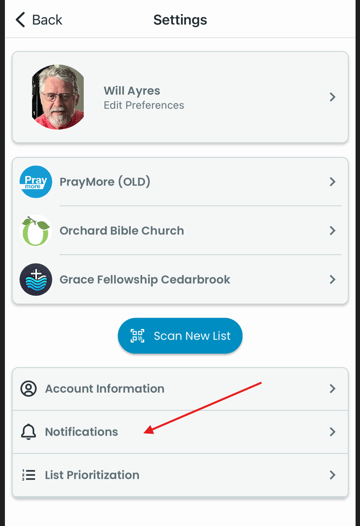
Access Notifications
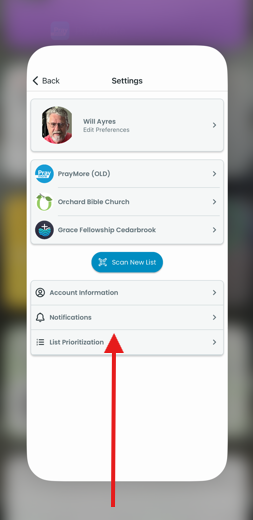
First tap on Profile>Settings. Then Tap on Notifications in the Settings screen.
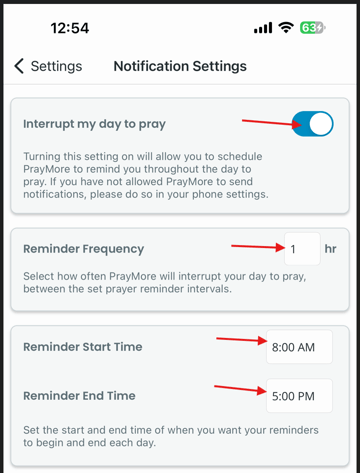
Setting Your Prayer Reminders
Check the four options seen below to confirm your reminders are activated. As shown, the button at the top left should be to the left, showing blue. The other three options should have data that reflect your desired frequency. Tap on <Settings in top left if you made any changes.
Troubleshoot #2: If Notifications set-up is not the problem, try a soft reset.
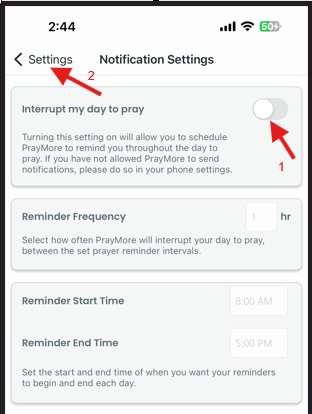
Turn off Notifications
Follow the steps in Troubleshoot #1 above. Now, 1) move the Interrupt my day to pray button to the left as shown below and then 2) save the change by tapping on <Settings at top left.
Quit and restart PrayMore.
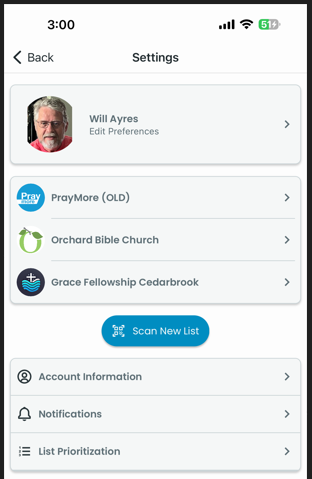
Saving the Notifications Settings screen will immediately take you back to Settings.
You can quit PrayMore as you would any other app by simply swiping up from the bottom of your screen to diminish the PrayMore screen, and then with a second similar motion to quit the app.
Tap on the PrayMore app  to restart the app. Follow the steps above in Troubleshoot #1 to turn on Notifications and save (<Settings) the change.
Troubleshoot #3: Is your phone a Samsung? Turn off adaptive battery and turn on permissions for Alarms & Reminders.
Turn off adaptive battery
In your Settings, navigate to Adaptive Battery