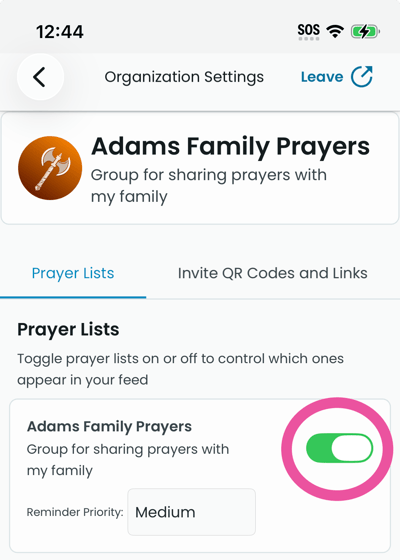
If your Feed is empty, the app may be telling you why (e.g. "No prayers in your lists" or "Turn on a list"). Try the following.
- Make sure you are signed in. Open Profile → Settings → Account. If you are not signed in, sign in. The screen shows your groups and lists on the Lists tab after signing in.
- Check that you have at least one list and that it is turned on. On the Profile tab go to Settings. Tap a group you are part of, and open Org settings. Open the Prayer lists tab. Make sure at least one list has its toggle turned on. Lists that are off do not show prayers in the Feed.
- Pull down on the Feed tab to refresh. The app fetches the latest prayers. The screen shows prayers appear if your lists have prayers and are turned on.
- It may also be possible that all prayers have expired. Prayers have a default expiration of one week after posting. You can set a longer expiration date when you share a prayer. (Change expiration date on prayer)
- If you have not joined any list yet, join one by scanning a QR code from your church or group. See "How to join a prayer list" for steps.